AppStore APP’s Reviews Bot 那些事
动手打造 APP 评价追踪通知 Slack 机器人
Click here to view the English version of this article.
點擊這裡查看本文章正體中文版本。
基于 SEO 考量,本文标题与描述经 AI 调整,原始版本请参考内文。
文章目录
AppStore APP’s Reviews Slack Bot 那些事
使用 Ruby+Fastlane-SpaceShip 动手打造 APP 评价追踪通知 Slack 机器人
{:target="_blank"}](/assets/cb0c68c33994/1*BMCG3cu21W5MbODBbhI-sA.webp)
Photo by Austin Distel
吃米不知米价
{:target="_blank"}](/assets/cb0c68c33994/1*Iv6qvrBfyv3bU1NK1hPVHg.webp)
最近才知道 Slack 中转发 APP 最新评价讯息的机器人是要付费的,我一直以为这功能是免费的;费用从 $5 到 $200 美金/月都有,因为各平台都不会只做「App Review Bot」的功能,其他还有数据统计、纪录、统一后台、与竞品比较…等等,费用也是照各平台能提供的服务为标准;Review Bot 只是他们的一环,但我就只想用这个功能其他不需要,如果是这样付费蛮浪费的。
问题
本来是用免费开源的工具 TradeMe/ReviewMe 来做 Slack 通知,但这个工具已年久失修,时不时 Slack 会爆喷一些旧的评价,看得让人心惊胆颤(很多 Bug 都早已修复,害我们以为又有问题!),原因不明。
所以考虑找其他工具、方法取代。
TL;DR [2022/08/10] Update:
现已改用全新的 App Store Connect API 重新设计 App Reviews Bot,并更名重新推出「 ZReviewTender — 免费开源的 App Reviews 监控机器人 」。
====
2022/07/20 Update
App Store Connect API 现已支援 读取和管理 Customer Reviews ,App Store Connect API 原生已支援存取 App 评价, 不需要再使用 Fastlane — Spaceship 去后台拿评价。
原理探究
有了动机之后,再来研究下达成目标的原理。
官方 API ❌
苹果有提供 App Store Connect API ,但没提供捞取评价功能。
[2022/07/20 更新]: App Store Connect API 现已支援 读取和管理 Customer Reviews
Public URL API (RSS) ⚠️
苹果有提供公开的 APP 评价 RSS 订阅网址 ,而且除了 rss xml 还提供 json 格式。
1
https://itunes.apple.com/国家码/rss/customerreviews/id=APP_ID/page=1/sortBy=mostRecent/json
国家码:可参考 这份文件 。
APP_ID:前往 App 网页版,会得到网址:https://apps.apple.com/tw/app/APP名称/id 12345678 ,id 后面的数字及为 App ID(纯数字)。
page:可请求 1~10 页,超过无法取得。
sortBy:
mostRecent/json请求最新的& json 格式,也可改为mostRecent/xml则为 xml 格式。
评价资料回传如下:
rss.json:
1
2
3
4
5
6
7
8
9
10
11
12
13
14
15
16
17
18
19
20
21
22
23
24
25
26
27
28
29
30
31
32
33
34
35
36
37
38
39
40
41
42
43
44
45
46
47
{
  "author": {
    "uri": {
      "label": "https://itunes.apple.com/tw/reviews/id123456789"
    },
    "name": {
      "label": "test"
    },
    "label": ""
  },
  "im:version": {
    "label": "4.27.1"
  },
  "im:rating": {
    "label": "5"
  },
  "id": {
    "label": "123456789"
  },
  "title": {
    "label": "很棒的存在!"
  },
  "content": {
    "label": "人生值得了~",
    "attributes": {
      "type": "text"
    }
  },
  "link": {
    "attributes": {
      "rel": "related",
      "href": "https://itunes.apple.com/tw/review?id=123456789&type=Purple%20Software"
    }
  },
  "im:voteSum": {
    "label": "0"
  },
  "im:contentType": {
    "attributes": {
      "term": "Application",
      "label": "应用程式"
    }
  },
  "im:voteCount": {
    "label": "0"
  }
}
优点:
公开、不需身份验证步骤即可存取
简单好用
缺点:
此 RSS API 很老旧都没更新
回传评价的资讯太少(没留言时间、已编辑过评价?、已回复?)
遇到资料错乱问题(后面几页偶尔会突然喷旧资料)
最多存取 10 页
关于我们遇到的最大问题是 3;但这部分不确定是我们用的 Bot 工具 问题,还是这个 RSS URL 资料有问题。
Private URL API ✅
这个方法说来有点旁门左道,也是我突发奇想发现的;但在后续参考了其他 Review Bot 做法之后发现很多网站也都是这样用,应该没什么问题而且我 4~5 年前就看过有工具这样做了,只是当时没深入研究。
优点:
同苹果后台资料
资料完整且最新
可做更多细节筛选
具备深度整合的 APP 工具也是用这个方法(AppRadar/AppReviewBot…)
缺点:
非官方公布方法(旁门左道)
因苹果实行全面两步骤登入,所以登入 session 需要定期更新。
第一步 — 嗅探 App Store Connect 后台评论区块 Load 资料的 API:
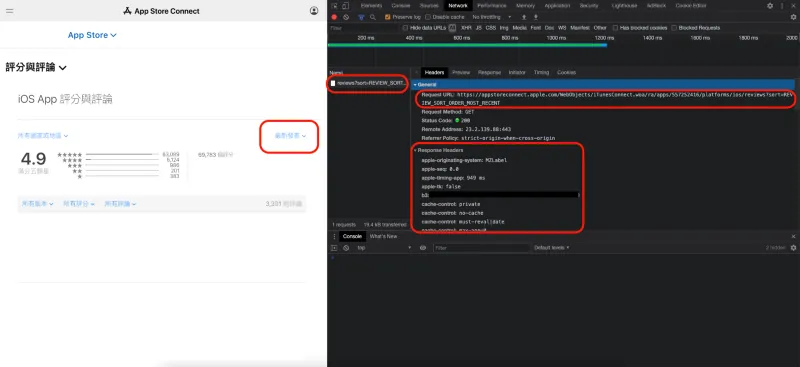
得到苹果后台是透过打:
1
https://appstoreconnect.apple.com/WebObjects/iTunesConnect.woa/ra/apps/APP_ID/platforms/ios/reviews?index=0&sort=REVIEW_SORT_ORDER_MOST_RECENT
这个 endpoint 取得评价列表:
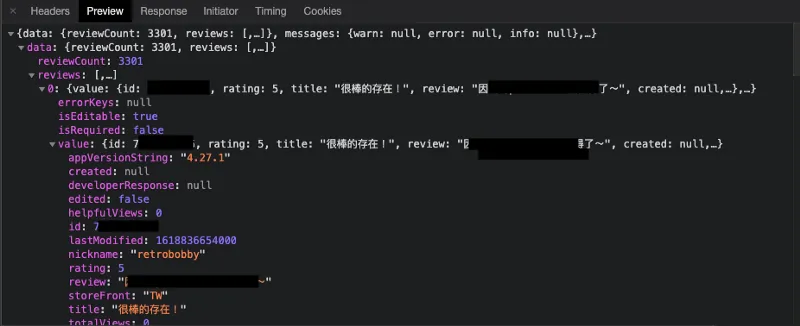
index = 分页 offset,一次最多显示 100 笔。
评价资料回传如下:
private.json:
1
2
3
4
5
6
7
8
9
10
11
12
13
14
15
16
17
18
19
20
{
  "value": {
    "id": 123456789,
    "rating": 5,
    "title": "很棒的存在!",
    "review": "人生值得了~",
    "created": null,
    "nickname": "test",
    "storeFront": "TW",
    "appVersionString": "4.27.1",
    "lastModified": 1618836654000,
    "helpfulViews": 0,
    "totalViews": 0,
    "edited": false,
    "developerResponse": null
  },
  "isEditable": true,
  "isRequired": false,
  "errorKeys": null
}
另外经过测试后发现,只需要在带上 cookie: myacinfo=<Token> 即可伪造请求得到资料:
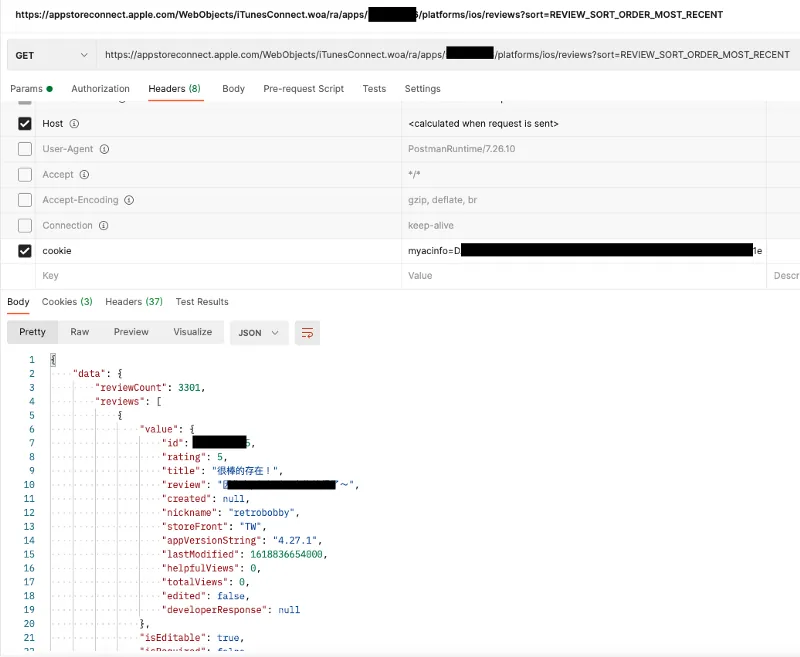
API 有了、要求的 header 知道了,再来就要想办法自动化取得后台这个 cookie 资讯。
第二步 —万能 Fastlane
因苹果现在实行全 Two-Step Verification,所以对于登入验证自动化变得更加烦琐,幸好与苹果斗智斗勇的 Fastlane ,除了正规的 App Store Connect API、iTMSTransporter、网页认证(包含两步骤认证)全都有实作;我们可以直接使用 Fastlane 的指令:
1
fastlane spaceauth -u <App Store Connect 帐号(Email)>
此指令会完成网页登入验证(包含两步骤认证),然后将 cookie 存入 FASTLANE_SESSION 档案之中。
会得到类似如下字串:
1
2
3
4
5
6
7
8
9
10
11
12
!ruby/object:HTTP::Cookie
name: myacinfo  value: <token>
domain: apple.com for_domain: true  path: "/"
secure: true  httponly: true  expires: max_age:
created_at: 2021-04-21 20:42:36.818821000 +08:00
accessed_at: 2021-04-21 22:02:45.923016000 +08:00
!ruby/object:HTTP::Cookie
name: <hash>  value: <token>
domain: idmsa.apple.com for_domain: true  path: "/"
secure: true  httponly: true  expires: max_age: 2592000
created_at: 2021-04-19 23:21:05.851853000 +08:00
accessed_at: 2021-04-21 20:42:35.735921000 +08:00
将 myacinfo = value 带入就能取得评价列表。
第三步 — SpaceShip
本来以为 Fastlane 只能帮我们到这了,再来要自己串起从 Fastlane 拿到 cookie 然后打 api 的 flow;没想到经过一番探索发现 Fastlane 关于验证这块的模组 SpaceShip 还有更多强大的功能!
SpaceShip
SpaceShip 里面已经帮我们打包好捞评价列表的方法 Class: Spaceship::TunesClient::get_reviews 了!
1
2
app = Spaceship::Tunes::login(appstore_account, appstore_password)
reviews = app.get_reviews(app_id, platform, storefront, versionId = '')
*storefront = 地区
第四步 — 组装
Fastlane、Spaceship 都是由 ruby 撰写,所以我们也要用 ruby 来制作这个 Bot 小工具。
我们可以建立一个 reviewBot.rb 档案,编译执行时只需在 Terminal 输入:
1
ruby reviewBot.rb
即可。 ( *更多 ruby 环境问题可参考文末提示)
首先 ,因原本的 get_reviews 口的参数不符合我们需求;我想要的是全地区、全版本的评价资料、不需要筛选、支援分页:
extension.rb:
1
2
3
4
5
6
7
8
9
# Extension Spaceship->TunesClient
module Spaceship
  class TunesClient < Spaceship::Client
    def get_recent_reviews(app_id, platform, index)
      r = request(:get, "ra/apps/#{app_id}/platforms/#{platform}/reviews?index=#{index}&sort=REVIEW_SORT_ORDER_MOST_RECENT")
      parse_response(r, 'data')['reviews']
     end
  end
end
所以我们自己在 TunesClient 中扩充一个方法,里面参数只带 app_id、platform = ios ( 全小写 )、index = 分页 offset。
再来组装登入验证、捞评价列表:
get_recent_reviews.rb:
1
2
3
4
5
6
7
8
9
10
11
12
13
14
index = 0
breakWhile = true
while breakWhile
  app = Spaceship::Tunes::login(APPStoreConnect 帐号(Email), APPStoreConnect 密码)
  reviews = app.get_recent_reviews($app_id, $platform, index)
  if reviews.length() <= 0
    breakWhile = false
    break
  end
  reviews.each { \\|review\\|
    index += 1
    puts review["value"]
  }
end
使用 while 遍历所有分页,当跑到无内容时终止。
再来要加上纪录上次最新一笔的时间,只通知没通知过的最新讯息:
lastModified.rb:
1
2
3
4
5
6
7
8
9
10
11
12
13
14
15
16
17
18
19
20
21
22
23
24
25
26
27
28
29
30
31
32
33
34
35
36
37
38
39
40
41
lastModified = 0
if File.exists?(".lastModified")
  lastModifiedFile = File.open(".lastModified")
  lastModified = lastModifiedFile.read.to_i
end
newLastModified = lastModified
isFirst = true
messages = []

index = 0
breakWhile = true
while breakWhile
  app = Spaceship::Tunes::login(APPStoreConnect 帐号(Email), APPStoreConnect 密码)
  reviews = app.get_recent_reviews($app_id, $platform, index)
  if reviews.length() <= 0
    breakWhile = false
    break
  end
  reviews.each { \\|review\\|
    index += 1
    if isFirst
      isFirst = false
      newLastModified = review["value"]["lastModified"]
    end

    if review["value"]["lastModified"] > lastModified && lastModified != 0
      # 第一次使用不发通知
      messages.append(review["value"])
    else
      breakWhile = false
      break
    end
  }
end

messages.sort! { \\|a, b\\|  a["lastModified"] <=> b["lastModified"] }
messages.each { \\|message\\|
    notify_slack(message)
}

File.write(".lastModified", newLastModified, mode: "w+")
单纯用一个 .lastModified 纪录上一次执行时拿到的时间。
*第一次使用不发通知,否则会一次狂喷
最后一步,组合推播讯息 & 发到 Slack:
slack.rb:
1
2
3
4
5
6
7
8
9
10
11
12
13
14
15
16
17
18
19
20
21
22
23
24
25
26
27
28
29
30
31
32
33
34
# Slack Bot
def notify_slack(review)
  rating = review["rating"].to_i
  color = rating >= 4 ? "good" : (rating >= 2 ? "warning" : "danger")
  like = review["helpfulViews"].to_i > 0 ? " - #{review["helpfulViews"]} :thumbsup:" : ""
  date = review["edited"] == false ? "Created at: #{Time.at(review["lastModified"].to_i / 1000).to_datetime}" : "Updated at: #{Time.at(review["lastModified"].to_i / 1000).to_datetime}"


  isResponse = ""
  if review["developerResponse"] != nil && review["developerResponse"]['lastModified'] < review["lastModified"]
    isResponse = " (回复已过时)"
  end

  edited = review["edited"] == false ? "" : ":memo: 使用者更新评论#{isResponse}:"

  stars = "★" * rating + "☆" * (5 - rating)
  attachments = {
    :pretext => edited,
    :color => color,
    :fallback => "#{review["title"]} - #{stars}#{like}",
    :title => "#{review["title"]} - #{stars}#{like}",
    :text => review["review"],
    :author_name => review["nickname"],
    :footer => "iOS - v#{review["appVersionString"]} - #{review["storeFront"]} - #{date} - <https://appstoreconnect.apple.com/apps/APP_ID/appstore/activity/ios/ratingsResponses\\|Go To App Store>"
  }
  payload = {
   :attachments => [attachments],
   :icon_emoji => ":storm_trooper:",
   :username => "ZhgChgLi iOS Review Bot"
  }.to_json
  cmd = "curl -X POST --data-urlencode 'payload=#{payload}' SLACK_WEB_HOOK_URL"
  system(cmd, :err => File::NULL)
  puts "#{review["id"]} send Notify Success!"
 end
SLACK_WEB_HOOK_URL = Incoming WebHook URL
最终结果
appreviewbot.rb:
1
2
3
4
5
6
7
8
9
10
11
12
13
14
15
16
17
18
19
20
21
22
23
24
25
26
27
28
29
30
31
32
33
34
35
36
37
38
39
40
41
42
43
44
45
46
47
48
49
50
51
52
53
54
55
56
57
58
59
60
61
62
63
64
65
66
67
68
69
70
71
72
73
74
75
76
77
78
79
80
81
82
83
84
85
86
87
88
89
90
91
92
93
94
95
96
97
98
99
100
101
102
103
104
105
106
107
108
109
110
111
112
113
114
115
require "Spaceship"
require 'json'
require 'date'

# Config
$slack_web_hook = "目标通知的 web hook url"
$slack_debug_web_hook = "机器人有错误时的通知 web hook url"
$appstore_account = "APPStoreConnect 帐号(Email)"
$appstore_password = "APPStoreConnect 密码"
$app_id = "APP_ID"
$platform = "ios"

# Extension Spaceship->TunesClient
module Spaceship
  class TunesClient < Spaceship::Client
    def get_recent_reviews(app_id, platform, index)
      r = request(:get, "ra/apps/#{app_id}/platforms/#{platform}/reviews?index=#{index}&sort=REVIEW_SORT_ORDER_MOST_RECENT")
      parse_response(r, 'data')['reviews']
     end
  end
end

# Slack Bot
def notify_slack(review)
  rating = review["rating"].to_i
  color = rating >= 4 ? "good" : (rating >= 2 ? "warning" : "danger")
  like = review["helpfulViews"].to_i > 0 ? " - #{review["helpfulViews"]} :thumbsup:" : ""
  date = review["edited"] == false ? "Created at: #{Time.at(review["lastModified"].to_i / 1000).to_datetime}" : "Updated at: #{Time.at(review["lastModified"].to_i / 1000).to_datetime}"


  isResponse = ""
  if review["developerResponse"] != nil && review["developerResponse"]['lastModified'] < review["lastModified"]
    isResponse = " (客服回复已过时)"
  end

  edited = review["edited"] == false ? "" : ":memo: 使用者更新评论#{isResponse}:"

  stars = "★" * rating + "☆" * (5 - rating)
  attachments = {
    :pretext => edited,
    :color => color,
    :fallback => "#{review["title"]} - #{stars}#{like}",
    :title => "#{review["title"]} - #{stars}#{like}",
    :text => review["review"],
    :author_name => review["nickname"],
    :footer => "iOS - v#{review["appVersionString"]} - #{review["storeFront"]} - #{date} - <https://appstoreconnect.apple.com/apps/APP_ID/appstore/activity/ios/ratingsResponses\\|Go To App Store>"
  }
  payload = {
   :attachments => [attachments],
   :icon_emoji => ":storm_trooper:",
   :username => "ZhgChgLi iOS Review Bot"
  }.to_json
  cmd = "curl -X POST --data-urlencode 'payload=#{payload}' #{$slack_web_hook}"
  system(cmd, :err => File::NULL)
  puts "#{review["id"]} send Notify Success!"
 end

begin
    lastModified = 0
    if File.exists?(".lastModified")
      lastModifiedFile = File.open(".lastModified")
      lastModified = lastModifiedFile.read.to_i
    end
    newLastModified = lastModified
    isFirst = true
    messages = []

    index = 0
    breakWhile = true
    while breakWhile
      app = Spaceship::Tunes::login($appstore_account, $appstore_password)
      reviews = app.get_recent_reviews($app_id, $platform, index)
      if reviews.length() <= 0
        breakWhile = false
        break
      end
      reviews.each { \\|review\\|
        index += 1
        if isFirst
          isFirst = false
          newLastModified = review["value"]["lastModified"]
        end

        if review["value"]["lastModified"] > lastModified && lastModified != 0
          # 第一次使用不发通知
          messages.append(review["value"])
        else
          breakWhile = false
          break
        end
      }
    end

    messages.sort! { \\|a, b\\|  a["lastModified"] <=> b["lastModified"] }
    messages.each { \\|message\\|
        notify_slack(message)
    }

    File.write(".lastModified", newLastModified, mode: "w+")
rescue => error
    attachments = {
        :color => "danger",
        :title => "AppStoreReviewBot Error occurs!",
        :text => error,
        :footer => "*因苹果技术限制,精准评价爬取功能约每一个月需要重新登入设定,敬请见谅。"
    }
    payload = {
        :attachments => [attachments],
        :icon_emoji => ":storm_trooper:",
        :username => "ZhgChgLi iOS Review Bot"
    }.to_json
    cmd = "curl -X POST --data-urlencode 'payload=#{payload}' #{$slack_debug_web_hook}"
    system(cmd, :err => File::NULL)
    puts error
end
另外还加上了 begin…rescue (try…catch) 保护,如果有出现错误则发 Slack 通知我们回来检查(多半是 session 过期)。
最后只要将此脚本加到 crontab / schedule 等排程工具定时执行即可!
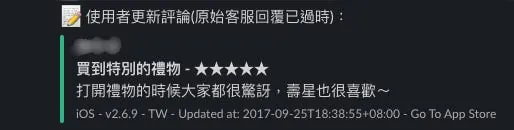
效果图:
免费的其他选择
AppFollow :使用 Public URL API (RSS),只能说堪用吧。
feedis.io :使用 Private URL API,需要把帐号密码给他们。
TradeMe/ReviewMe :自架服务(node.js),我们原先用这个,但遇到前述问题。
温馨提示
1.⚠️Private URL API 方法,如果用有二阶段验证的帐号,最长每 30 天都需要重新验证才能使用且目前无解;如果有办法生出没二阶段的帐号就可以无痛爽爽用。
{:target="_blank"}](/assets/cb0c68c33994/1*EE2J5HmdiIogMwC3Iiy0KA.webp)
#important-note-about-session-duration
2.⚠️不论是免费、付费、本文的自架;切勿使用开发者帐号,务必开一个独立的 App Store Connect 帐号使用,权限只开放「Customer Support」;防止资安问题。
3.Ruby 建议使用 rbenv 进行管理,因系统自带 2.6 版容易造成冲突。
4.在 macOS Catalina 如遇到 GEM、Ruby 环境错误问题,可参考 此回复 解决。
Problem Solved!
经过以上心路历程,更了解的 Slack Bot 的运作方式;还有 iOS App Store 是如何爬取评价内容的,另外也摸了下 ruby!写起来真不错!
有任何问题及指教欢迎 与我联络 。

本文首次发表于 Medium (点击查看原始版本),由 ZMediumToMarkdown 提供自动转换与同步技术。